Updated 2026-10-13 · 7 min read
TikTok stream key: how to go LIVE with OBS and Streamlabs
Many streamers want to go LIVE on TikTok from a computer, with a good camera, scenes and overlays in OBS or Streamlabs. For that you need a stream key (Stream Key) and a server address (Server URL), or TikTok-approved access for Streamlabs. Here is who can get them, how to set up both programs and what to do if LIVE Center doesn't show the option you need.
Who gives out the stream key
Only TikTok itself grants access to streaming through third-party software. It decides automatically, based on your account data. An agency has no button that turns on a key for a specific creator, and agency support can't issue one manually either.
TikTok doesn't publish the exact requirements, and they vary by country. Access usually goes to accounts that meet the requirements below.
There is also a practical pattern: according to Streamlabs, creators who work with an official TikTok LIVE agency get the key most often. The agency doesn't turn the key on itself, but it helps you meet the requirements faster, build a regular streaming routine and understand why you were refused.
- Age 18+, verified on the account.
- Around 1,000 followers or more. This applies to the key. Regular LIVE from the phone opens earlier for agency creators, through a trial task.
- No recent Community Guidelines violations or LIVE restrictions.
- Regular streams: TikTok looks at your recent LIVE activity.
- A country where TikTok issues keys. In some regions they aren't available at all.
How to check if you have access
- Open livecenter.tiktok.com on a computer and log in with the same account you use on your phone. The key isn't shown in the mobile app.
- Look for LIVE Room, Go LIVE or LIVE Producer in the left menu. You can also open livecenter.tiktok.com/producer directly.
- If a page with Server URL and Stream Key fields opens, you have access.
- If the option is missing or the link redirects you to another page, TikTok hasn't given your account access yet. See below for what to do in that case.
How to stream with Streamlabs
Streamlabs Desktop has a direct TikTok integration. Once you're approved, you don't need a key or server address: the program sends the stream itself. TikTok support recommends this route too.
- Download Streamlabs Desktop from streamlabs.com, install it and open it.
- Log in and choose TikTok as your platform. Sign in with a QR code, phone, email, Google, Apple or another method.
- Allow Streamlabs to access your TikTok account.
- Click Go Live, then Apply for TikTok LIVE permission, and submit the application.
- Once approved, set up your scenes (camera, microphone, overlays), click Go Live and enter the stream title and category.
Streamlabs with a stream key
If you already have a Stream Key in LIVE Center, you can also connect Streamlabs with it, like a regular RTMP server.
- In LIVE Center, open LIVE Room, enter a title and category and click Save & Go LIVE. The page will show the Server URL and Stream Key.
- In Streamlabs, open Settings → Stream and choose Custom Streaming Server.
- Paste the Server URL into the URL field and the Stream Key into the Stream key field, then click Done.
- Click Go Live. A preview appears in LIVE Center within a few seconds, and your stream starts.
How to stream with OBS Studio
- Download OBS Studio from obsproject.com.
- Get the Server URL and Stream Key in LIVE Room, as described above.
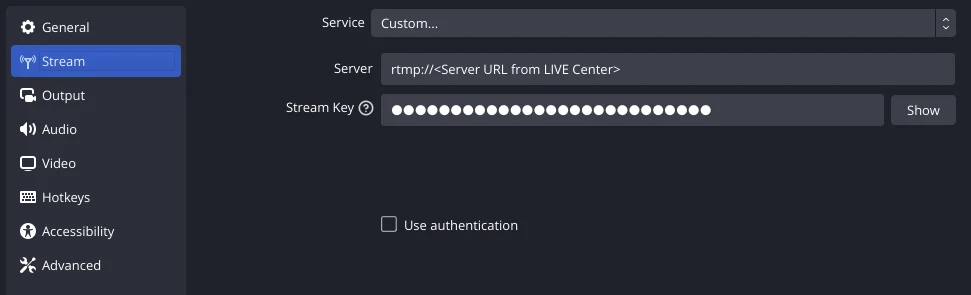
- In OBS, open Settings → Stream: set Service to Custom, paste the Server URL into the Server field and the Stream Key into the Stream Key field.
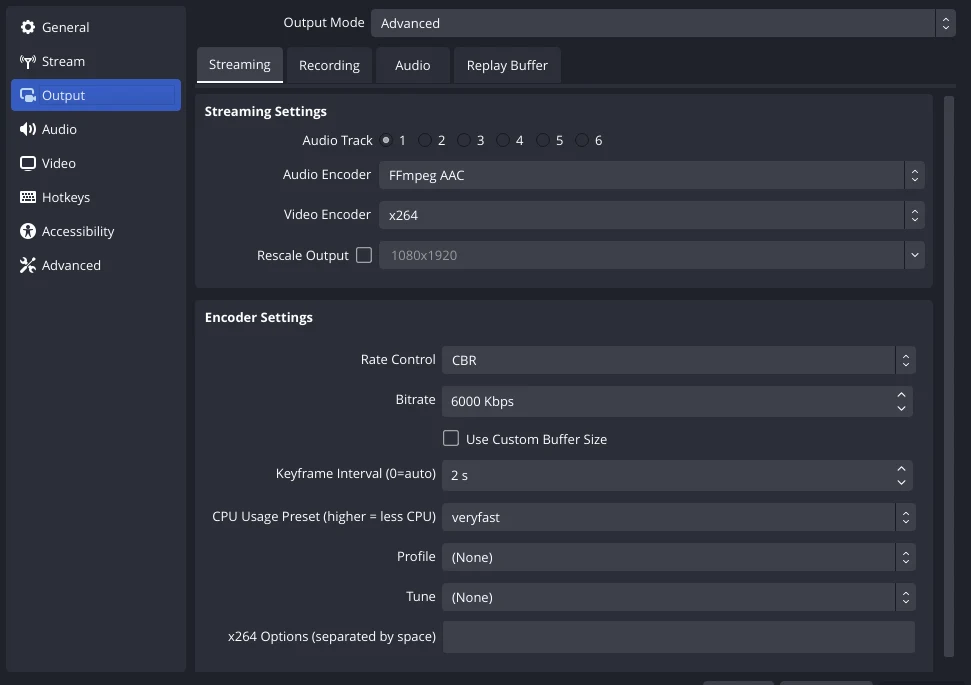
- Settings → Output: use the NVIDIA NVENC H.264 encoder if you have an NVIDIA graphics card, otherwise x264. Set the bitrate to 4,000–6,000 Kbps and the keyframe interval to 2 seconds.
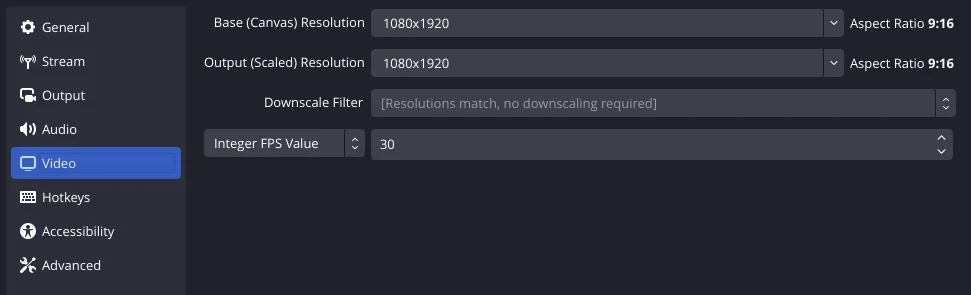
- Settings → Video: for a vertical stream, use 1080×1920 (720×1280 on a weaker computer) at 30 frames per second.
- Add sources: Video Capture Device (camera), Audio Input Capture (microphone), and Display Capture or Game Capture if needed.
- Click Start Streaming.
Tips on the key and stream quality
- The key changes for every stream. Copy a new one before each start.
- Never share your key: anyone who has it can stream on your account.
- Your upload speed should be at least 1.5 times your bitrate. For 6,000 Kbps, that means 9 Mbps or more.
- If the stream won't start, check that the key is copied in full with no spaces, and that the account isn't already LIVE from your phone.
If Streamlabs says "Access not approved or revoked"
This means TikTok hasn't yet approved your account for streaming through third-party software. TikTok makes this decision automatically, and an agency can't influence it. But you can improve your chances of approval.
- Do a few regular streams from your phone or through TikTok LIVE Studio over several days.
- Check your account status in the app: Settings and privacy → Account status. There should be no warnings.
- Set up your profile: avatar, bio, verified age.
- Apply again in Streamlabs 24–48 hours after your last stream. If you're refused again, wait about a week.
- Keep in mind that Streamlabs names gaming as the main content for third-party software. Talk streams may be approved less often.
If LIVE Center has no LIVE Room option
Don't waste days while you wait for access: streams from your phone and through TikTok LIVE Studio also count toward your account activity. LIVE Studio is TikTok's official program for streaming from a computer. It doesn't need a key, and it supports a camera, screen capture and overlays.
If you meet the requirements but still have no access, contact TikTok support: in the app, go to Profile → menu → Settings and privacy → Report a problem → LIVE and ask about access to the stream key.
FAQ
- Can an agency turn on the stream key? No, only TikTok grants access. But according to Streamlabs, agency creators get it more often: the agency helps you meet the requirements and understand why you were refused.
- Why isn't the key shown in the app? The key is only available on a computer, in LIVE Center.
- Do I need a key for Streamlabs? No, if TikTok approved your application in Streamlabs. Then you stream by logging into your account.
- Can I use an old key? No, TikTok issues a new key for every stream.
- How many days until I get access? TikTok doesn't give a timeline. Regular streams and an account with no violations usually help.