
Updated 2026-10-19 · 10 min read
TikTok LIVE battles and matches: how they work and how to earn from them
A battle, or match, is one of the strongest formats on TikTok LIVE. Two streamers join their LIVEs, a score appears on screen, and viewers on both sides support their creator with gifts. A good battle introduces you to another audience, livens up the chat and brings more diamonds than a regular stream. Here is how to start a match, prepare for it, choose an opponent and what not to do. We also take a close look at the arranged battle: an event announced in advance that both audiences come to the LIVE for.
What a TikTok LIVE battle is
In the app this feature is called "Match". Streamers call it a battle or PK. Two creators connect, the screen splits in half, and a score bar and timer appear at the top. Each side's score grows when viewers send gifts, and when the timer runs out TikTok announces the winner.
Don't confuse a match with a regular co-host LIVE. A co-host LIVE is for talking and shared content, while a match adds competition and a score. Creators first join their LIVEs, and only then one of them starts a match.
Why streamers need battles
- New audience: your opponent's viewers see you, open your profile and follow.
- More activity: the timer and score create excitement, the chat comes alive and gifters are more willing to support a creator in a competition.
- More diamonds: a prepared battle usually brings more gifts than a regular stream of the same length.
- League position: match results affect a creator's place in the TikTok LIVE league, and a higher place makes the stream more visible.
- Connections: regular battles with the same creators turn into friendly audiences and joint shows.
Step 1. Invite a creator to a co-host LIVE
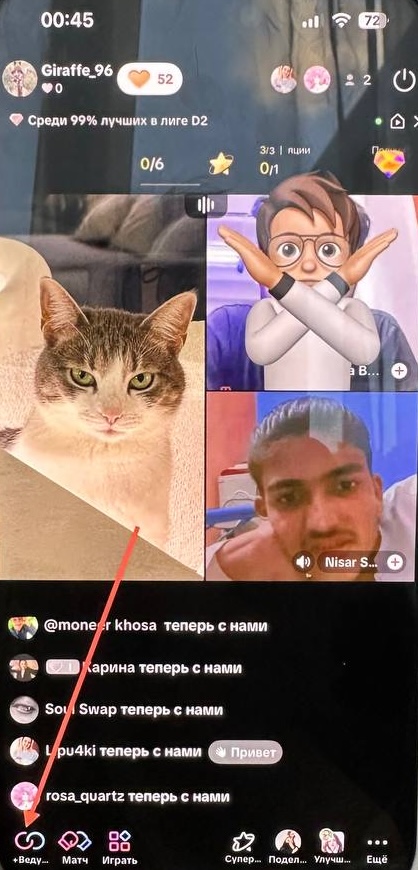
During a LIVE, the bottom bar has buttons for co-host, "Match" and games. Don't mix up two tools: "Guests" (multi-guest) brings in viewers and invited participants by audio or video, while co-host joins the LIVEs of several creators. A match is started with a co-host.
Step 2. Choose an opponent from the list
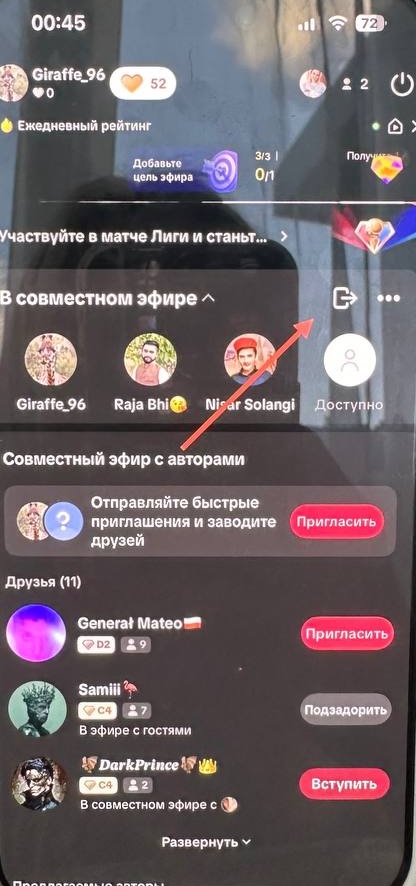
Tap the co-host button. A panel opens with the creators already connected at the top and your friends and suggested creators below. Each one shows their league and how many people are in their LIVE. Tap "Invite" next to the creator you agreed with. If a creator is already in a co-host LIVE, you will see a "Join" button instead.
Before connecting, agree on the language, topic and duration. Invitations to strangers without an agreement are often declined.
Step 3. Start the match
Once your co-host has joined, tap "Match". The screen splits in two, a colored score bar and a countdown timer appear at the top, and each creator's league is shown. Never start a match without the other creator's consent, and explain the format to viewers in advance.
During a match, each creator's top gifters for the round appear under their window. It's a great chance to thank them by name.
How the score, wins and league work
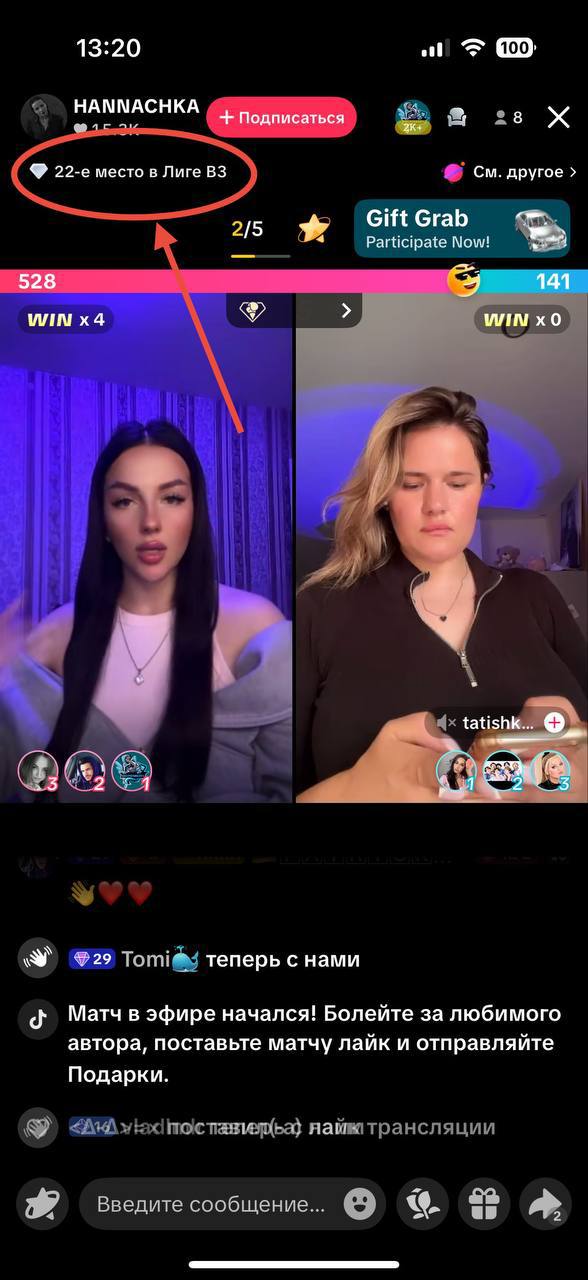
A side's score grows from its viewers' gifts. After a win, the creator gets a win streak badge such as "WIN ×4". Above the LIVE, TikTok shows the creator's league place, for example 22nd in league B3, and a chat message announces the start of the match and invites viewers to support their favorite creator.
TikTok changes and tests the exact scoring rules, round length and league structure in different countries, so go by what you see in your own app.
Arranged battle: the main event for a streamer with an audience
A regular match is often random: a creator taps "Match", TikTok finds an opponent, and a few minutes later it's over. Viewers only learn about the battle if they happen to be in the LIVE at that moment.
An arranged battle works differently. Two streamers who already have their own audiences agree on a date and time in advance, announce the meeting for a week or two and invite their viewers and gifters to come. By the time the battle starts, both sides are ready: regular viewers are there to support their creator, gifters know exactly when their help will be needed, and the chat is fired up before the first second.
That is why scores in arranged battles are usually many times higher than in random matches. There are more people in the LIVE, more emotion and more support. It is no longer a moment in a regular stream but an event people wait for, talk about in chat afterwards and schedule a rematch for.
- More viewers: people know about the battle in advance, both audiences show up and the viewer count grows before the start.
- More emotion: viewers cheer for "their" creator, watch the score bar and live through it together. The brightest moments are a last-second comeback and a shared victory.
- A close-knit community: regular gifters become a team that prepares, cheers and celebrates together.
- Audiences meet: your opponent's viewers see you at your best, and many stay with you after the battle.
- More diamonds: at the same length, a well-prepared arranged battle can bring in more than several regular streams.
How to prepare an arranged battle: a day-by-day plan
Most of an arranged battle's success is decided before the LIVE. Here is a plan that works.
A short 10–15 second animated poster works well: it is easy to post as a story and as a separate TikTok video, and motion catches the eye in the feed better than a static image.
- 1–2 weeks before. Agree with your opponent on the date, a time that suits both audiences' time zones, duration, number of rounds, language and playful tasks for the loser. Make sure you can both go LIVE on time.
- A week before. Announce the battle: say it on your LIVE, add the date to your profile bio and post a short teaser video with your opponent or a poster. If your app has LIVE Events, create one: followers can sign up and get a reminder before the start.
- 2–3 days before. Remind viewers on every stream, personally thank your regular gifters for their support and tell them when it starts. Talk about the event, not about gifts: you are inviting people to a show, not a fundraiser.
- On the day. A short "tonight at 9 pm" video, then check your internet, battery, lighting and sound. Go LIVE early to gather viewers before your opponent connects.
- During the battle. Introduce your opponent, welcome their audience, comment on the score and thank gifters by name. The emotion is the show.
- Don't hold arranged battles too often. We recommend one big arranged battle no more than once a month, so it stays an event and gifters don't burn out. In between, run regular streams and short matches with friends.
How to choose an opponent
- Look beyond diamonds: language, time zone, communication style and average viewers matter.
- Too big a gap in audience size makes the battle dull for both sides.
- Before agreeing, watch a few of the creator's streams and make sure they are respectful and follow the rules.
- Look for creators with a similar format: chat streams with chat streams, music with music, games with games.
How to run a battle respectfully
Introduce your opponent, greet their viewers and keep the conversation going. Thank your gifters, but don't compare people's worth by gifts or demand gifts: pressure pushes viewers away and may break TikTok's Community Guidelines.
Tasks for the loser must be safe and agreed in advance. Humiliation, threats, dangerous tasks, sexualized punishments and provocations are not allowed. Each host is responsible for their own LIVE: if the opponent breaks the rules, stop it or end the connection.
What to do after the battle
- Thank your opponent and both audiences, whatever the result.
- Note your viewers, new followers, diamonds and how the conversation went, so you know who is worth a rematch.
- Save the best moments for short videos if you have the right to use the recording.
- Agree on a rematch if both audiences enjoyed the battle.
Arranged battles in StreamHub Club
StreamHub creators can plan battles right in the StreamHub Club dashboard. The Battles section unlocks at level 5 together with Ranking, where you can see other agency creators and their TikTok profiles.
- You can submit a request at least 5 days before the battle date: set the date, time and expected diamonds.
- If you already have an opponent, enter their TikTok. If not, choose to get help finding one, and the agency will try to match you with an opponent, though it can't guarantee one by the chosen date.
- The club's training has a dedicated module on co-host LIVEs and battles, and the daily "What to do today" plan tells you when it's time to plan a battle.
FAQ
- How is a match different from a co-host LIVE? A co-host LIVE joins creators to talk. A match runs on top of it and adds a score, a timer and a winner.
- What is an arranged battle? It is a match between two streamers with audiences who agree on the date and announce it in advance. Both audiences come on purpose, so there are usually far more viewers, emotions and gifts than in a random match.
- Can I battle without followers? Matches are available to anyone with LIVE access. But the more regular viewers you have, the more exciting the battle and the more willing other creators are to accept.
- Do I have to win? No. Even a lost battle brings new viewers and followers. What matters more is that both audiences enjoy it and want to come back.
- How often should I battle? Short matches with friends are fine during regular streams. A big arranged battle with prepared gifters is best held no more than once a month.